Step 1. Installation
Install the Claude Code Desktop app and copy all 54 MedSci Skills.
No terminal or command line required. Also works with Codex, Cursor, and GitHub Copilot — the installer sets up all of them by default; add --target claude to install for Claude Code only.
Quick Start (recommended)
The recommended setup also turns on update reminders, so Claude Code tells you when a new version ships — without it you stay on the version you installed and are never told. Pick whichever is easier; both do the same thing.
Option A — Already using Claude Code? Paste this in:
"Install MedSci Skills by running npx medsci-skills install --enable-update-notify in the terminal, then tell me when it's done and remind me to restart Claude Code."
Claude runs the installer for you and confirms when it's finished.
Option B — One terminal command (Node 18+)
1. Open the Terminal app — macOS: press Cmd + Space, type "Terminal", Enter. Windows: Start menu → "Terminal" (or "Command Prompt").
2. Paste this one line and press Enter:
npx medsci-skills install --enable-update-notify --desktop-launcher3. When it finishes, fully quit and reopen Claude Code. Done.
--enable-update-notifyshows a one-line "update available" notice in Claude Code; --desktop-launcheradds an "Update MedSci Skills" icon to your Desktop for one-click updates. Installs from npm (needs Node 18+; check with npx medsci-skills doctor).
Then try a skill in plain English
"Search PubMed for recent studies on AI-assisted lung nodule detection and give me the top 10 results"
"Check my manuscript against STARD 2015 guidelines"
"Analyze this CSV and generate a demographics table with appropriate statistics"
No slash commands required — just describe what you need; Claude picks the right skill.
No terminal at all? Download the classroom installer for macOS or Windows, unzip it, and double-click installers/install-macos.command or installers/install-windows.cmd. It also turns on update reminders and adds an "Update MedSci Skills" icon to your Desktop. The manual download-and-copy steps below work too, but set up no update reminders.
Other ways to install
Claude Code plugin marketplace
/plugin marketplace add Aperivue/medsci-skills
/plugin/pluginlists the category plugins; enable the ones you want. A skill installed as a plugin is called under its plugin's name, e.g. /medsci-analysis:analyze-stats.
GitHub CLI 2.90+
gh skill install Aperivue/medsci-skills --all --agent claude-code --scope userName one skill instead of --all to install just that one. Keep both flags: without --scope user the skills go into the current project instead of your home folder, and without --agent they may be installed for a different agent.
Staying on one release
If a paper or protocol cites the version it used, install that version rather than the latest. For v6.0.0:
npx medsci-skills@6.0.0 install
/plugin marketplace add Aperivue/medsci-skills@v6.0.0
gh skill install Aperivue/medsci-skills --all --pin v6.0.0 --agent claude-code --scope user
Every option, where the files go, and how to update: docs/install.md.
Download Claude Code Desktop
Claude Code Desktop is the official desktop app by Anthropic. It works just like any regular application — no terminal needed.
Download link
Go to claude.ai/download and download the version for your operating system.
1. Double-click the downloaded .dmg file.
2. Drag the Claude Code icon into the Applications folder.
3. Launch Claude Code from Applications.
4. Sign in with your Anthropic account.
Download MedSci Skills
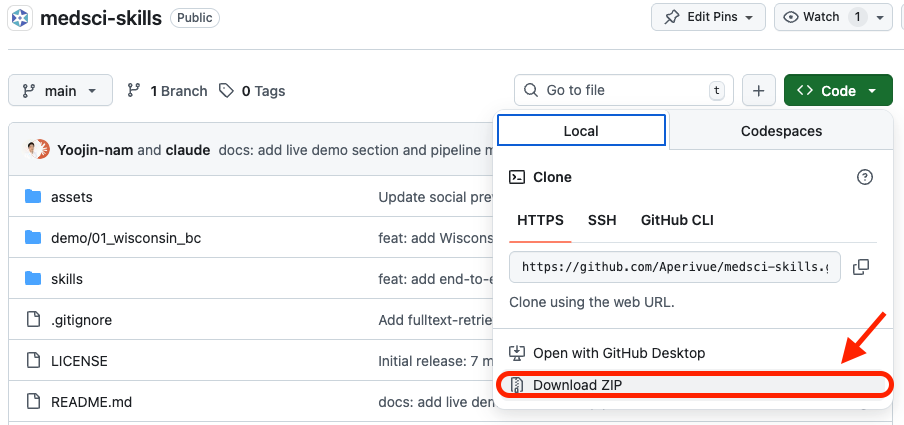
Download the skills as a ZIP file from GitHub. You do not need to use git clone.
1. Visit github.com/Aperivue/medsci-skills
2. Click the green <> Code button.
3. Click Download ZIP.
4. Extract the downloaded ZIP file.
Copy the skills folder
Copy the skillsfolder from the extracted archive into Claude Code's skills directory.
1. Open Finder.
2. From the menu bar, select Go > Go to Folder (shortcut: Cmd + Shift + G).
3. Enter the following path:
~/.claude/4. If there is no skills folder inside .claude, create one.
5. Copy all folders from medsci-skills-main/skills/ into ~/.claude/skills/.
Expected structure
~/.claude/skills/
├── analyze-stats/
│   └── SKILL.md
├── check-reporting/
│   └── SKILL.md
├── orchestrate/
│   └── SKILL.md
├── write-paper/
│   └── SKILL.md
└── ... (54 skills, plus 8 small folders
that redirect renamed skills)Verify the installation
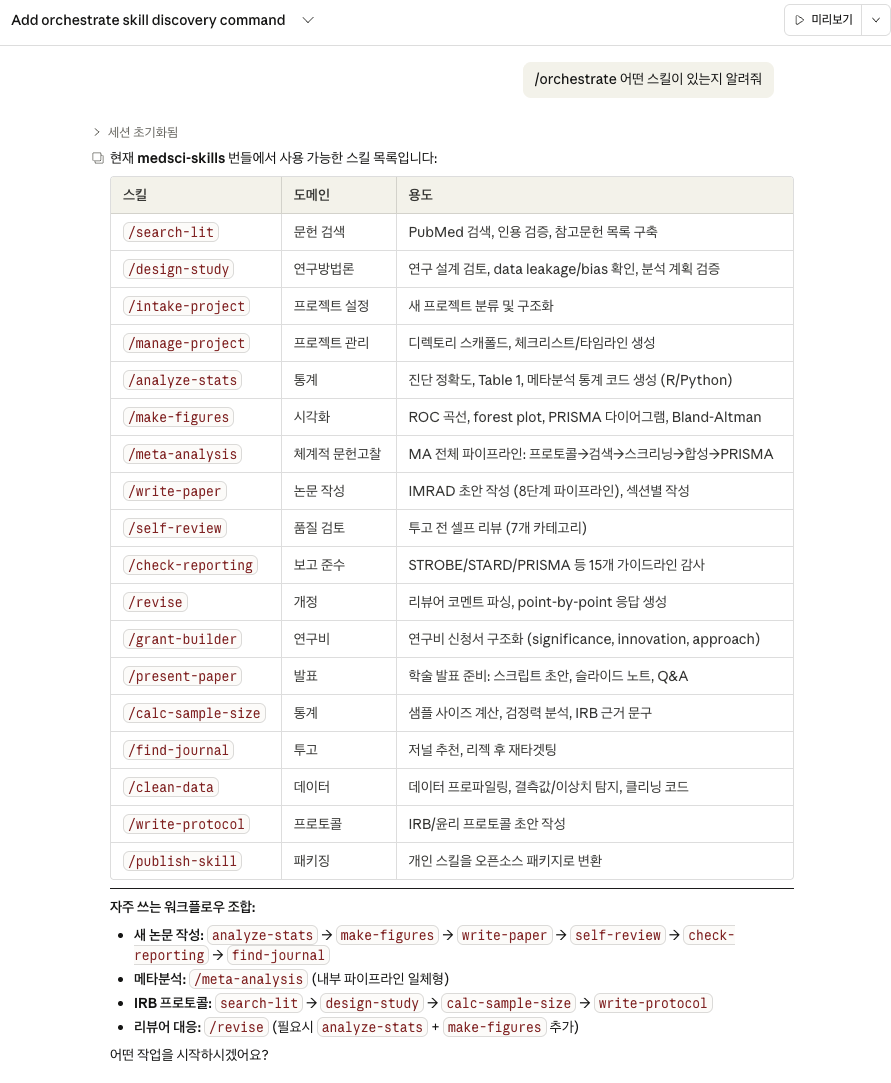
Restart Claude Code Desktop and check that the skills are loaded.
1. Quit Claude Code Desktop completely, then reopen it.
2. Type the following in the chat:
/orchestrate List all available skills3. If you see a list of 54 skills, the installation is complete.
Install Python (optional)
Python is required for statistical analysis (analyze-stats) and figure generation (make-figures).
Only if needed
Text-based skills like literature search, reporting guideline checks, and manuscript drafting work without Python. You can skip this step for now and install later.
1. Download Python 3.11 or later from python.org/downloads
2. Run the installer with the default settings.
3. Claude Code will install the required libraries automatically — nothing else to do.
Trouble installing?
- Nothing happens when I type "/orchestrate"
- Double-check the skills folder path. Each skill folder must contain a
SKILL.mdfile. Verify that~/.claude/skills/orchestrate/SKILL.mdexists. - Claude Code Desktop won't launch
- Make sure your Anthropic account has an active subscription (Pro or Max). Claude Code is not available on free accounts.
- I can't see the .claude folder on macOS
- Press Cmd + Shift + . in Finder to show hidden files. Alternatively, use Go > Go to Folder and type the path directly.
More questions? Check the FAQ page.